Ho ripreso da poco a sviluppare codice utilizzando vim inceve dei soliti eclipse/netbeans. Lasciando perdere le discussioni su cosa sia meglio (vim o IDE), vediamo invece quali plugin ho deciso in installare e quali settings. Per semplificare la gestione dei plugin, ho preparato uno script di installazione che in un colpo solo effettua l'installazione e la configurazione dei plugin per vim che ho scelto, che ora vedimao in dettaglio.
Chi ha fretta, può andare direttamente allo script completo
Pathogen
Per prima cosa, ho installato pathogen, che semplifica la gestione dei plugin, assicurando anche l'installazione del client di GIT, ed effettuando una copia dell'eventuale configuazione di vim e relativi plugin già presenti.
#!/bin/bash
apt-get install -y git
cd ~
#### make a backupmv ~/.vim ~/vim_`date +%y%m%d%H%M%S`
mkdir .vim#### install pathogen
cd ~
ln -s ~/.vim/vimrc .vimrc
rm -Rf pathogen
git clone git://github.com/tpope/vim-pathogen.git pathogen
mv pathogen/autoload ~/.vim/autoload
cat & ~/.vim/vimrc <<END
call pathogen#runtime_append_all_bundles()
call pathogen#helptags()
ENDcd .vim
git init
git add .
git commit -m "Initial commit"###### install fugitive
cd ~/.vim
git submodule add git://github.com/tpope/vim-fugitive.git bundle/fugitive
git submodule init && git submodule update
Solarized
Solarized è un plugin che permette di cambiare la palette di colori utilizzata da vim.
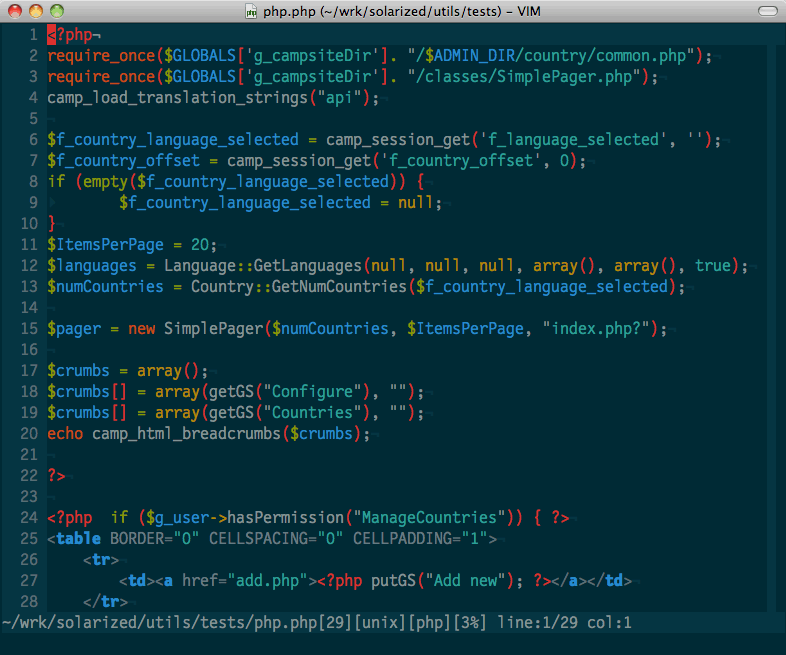
Ecco come installarlo:
#### install Solarized
cd ~/.vim
git submodule add git://github.com/altercation/vim-colors-solarized.git bundle/solarized
git submodule init && git submodule updatecat >> ~/.vim/vimrc <<END
set background=dark
let g:solarized_termtrans=1
let g:solarized_termcolors=256
let g:solarized_contrast="high"
let g:solarized_visibility="high"
colorscheme solarized
ENDecho export TERM="xterm-256color" >> ~/.bashrc
SuperTab
SuperTab è un plugin per vim che aggiunge mappa la funzionalità di autocompletamento sul tasto [TAB] quando si è in insert mode. L'installazione è piuttosto semplice:
### install SuperTab
cd ~/.vim
git submodule add https://github.com/ervandew/supertab.git bundle/supertab
git submodule init && git submodule update
CTRLP
CTLP è un plugin per vim che permette di effettuare ricerche "fuzzy" all'interno di files e del buffer di vim, in modo molto semplice e potente.

Ecco come installarlo:
###### install CTRLP
cd ~/.vim
git submodule add https://github.com/kien/ctrlp.vim.git bundle/ctrlp
git submodule init && git submodule updatecat >> ~/.vim/vimrc <<END
set runtimepath^=~/.vim/bundle/ctrlp
ENDvim -c ':helptags ~/.vim/bundle/ctrlp/doc|q!'
Syntastic
Syntastic è un plugin per vim che effettua il syntax checking dei files. Supporta praticamente tutti i linguaggi più utilizzati, quali applescript, c, coffee, cpp, css, cucumber, cuda, docbk, erlang, eruby, fortran, gentoo_metadata, go, haml, haskell, html, javascript, json, less, lua, matlab, perl, php, puppet, python, rst, ruby, sass/scss, sh, tcl, tex, vala, xhtml, xml, xslt, yaml, zpt.

Nell'ulizzo con il PHP ho trovato "fastidioso" il fatto che venissero eseguti anche i check di "stile" tramite phpcs, in quanto spesso mi capita di lavorare su codice legacy che non è compliant con standard di "code style". Per disabilitare l'utilizzo di phpcs, occorre aggiungere nel .vimrc
let g:syntastic_phpcs_disable=1
Ecco come installarlo:
###### install Syntastic to check systax inline
cd ~/.vim
git submodule add https://github.com/scrooloose/syntastic.git bundle/syntastic
git submodule init && git submodule updatecat >> ~/.vim/vimrc <<END
let g:syntastic_mode_map={'mode':'active', 'active_filetypes':[], 'passive_filetypes':['html']}
let g:syntastic_phpcs_disable=1
ENDvim -c ':Helptags|q!'
Powerline
Powerline è un plugin per vim che sostituisce la statu line di vim (l'ultima riga in basso per intenderci) con una più accattivamente graficamente e ricca di informazioni, senza tuttavia distrarre l'attenzione. Ecco come appare
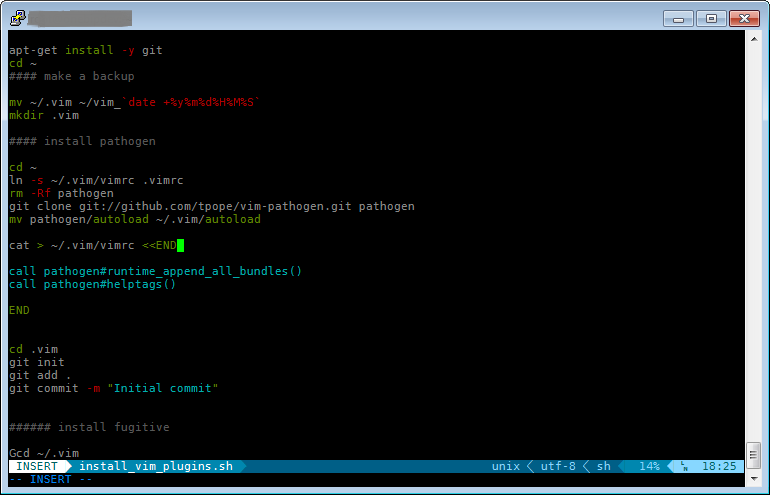
Poiche normalmente utilizzo PuTTY come terminale da windows, ho dovuto installare un font patchato. Ecco come fare:
- scaricare il font DejaVuSansMono-Powerline.ttf da https://gist.github.com/1630581#file_deja_vu_sans_mono_powerline.ttf
- installare il font su windows (basdtare fare doppio click sul font)
- Configurare PuTTY in modo da utilizzare il "font DejaVu Sans Mono for Powerline" andando in Change
- settings-->Window-->Appearance-->font settings.
Ecco la porzione di script relativa all'installazione di Powerline:
###### install Powerline
#
# Remember to download patched font DejaVuSansMono-Powerline.ttf for windows
# from https://gist.github.com/1630581#file_deja_vu_sans_mono_powerline.ttf
# and install in in windows, then select "DejaVu Sans Mono for Powerline" in PuTTY
# (Window-->Appearance-->font)cd ~/.vim
git submodule add https://github.com/Lokaltog/vim-powerline.git bundle/powerline
git submodule init && git submodule updatecat >> ~/.vim/vimrc <<END
let g:Powerline_symbols='fancy'
END
Altre Personalizzazioni
Ho poi effettuato un aseri di personalizzazioni del .vimrc:
###### configure .vimrc with custom settings
cat >> ~/.vim/vimrc <<END
set expandtab tabstop=4 shiftwidth=4 softtabstop=4
set incsearch
set hlsearch
set ignorecase
set smartcase
set encoding=utf-8
set showcmd
set comments=sr:/*,mb:*,ex:*/
set wildmenu
set wildmode=longest,full
set wildignore=.svn,.git
set nocompatible
set laststatus=2
END
Script completo
Ecco di seguito lo script completo, che effettua tutte le operazioni che ho descritto.
#!/bin/bashapt-get install -y git
cd ~
#### make a backupmv ~/.vim ~/vim_`date +%y%m%d%H%M%S`
mkdir .vim#### install pathogen
cd ~
ln -s ~/.vim/vimrc .vimrc
rm -Rf pathogen
git clone git://github.com/tpope/vim-pathogen.git pathogen
mv pathogen/autoload ~/.vim/autoloadcat > ~/.vim/vimrc <<END
call pathogen#runtime_append_all_bundles()
call pathogen#helptags()END
cd .vim
git init
git add .
git commit -m "Initial commit"###### install fugitive
Gcd ~/.vim
git submodule add git://github.com/tpope/vim-fugitive.git bundle/fugitive
git submodule init && git submodule update#### install Solarize
cd ~/.vim
git submodule add git://github.com/altercation/vim-colors-solarized.git bundle/solarized
git submodule init && git submodule updatecat >> ~/.vim/vimrc <<END
set background=dark
let g:solarized_termtrans=1
let g:solarized_termcolors=256
let g:solarized_contrast="high"
let g:solarized_visibility="high"
colorscheme solarized
ENDecho export TERM="xterm-256color" >> ~/.bashrc
### install SuperTab
cd ~/.vim
git submodule add https://github.com/ervandew/supertab.git bundle/supertab
git submodule init && git submodule update###### install CTRLP
cd ~/.vim
git submodule add https://github.com/kien/ctrlp.vim.git bundle/ctrlp
git submodule init && git submodule updatecat >> ~/.vim/vimrc <<END
set runtimepath^=~/.vim/bundle/ctrlp
ENDvim -c ':helptags ~/.vim/bundle/ctrlp/doc|q!'
###### install Syntastic to check syntax inline
cd ~/.vim
git submodule add https://github.com/scrooloose/syntastic.git bundle/syntastic
git submodule init && git submodule updatecat >> ~/.vim/vimrc <<END
let g:syntastic_mode_map={'mode':'active', 'active_filetypes':[], 'passive_filetypes':['html']}
let g:syntastic_phpcs_disable=1
ENDvim -c ':Helptags|q!'
###### install Powerline
#
# Remember to download patched font DejaVuSansMono-Powerline.ttf for windows
# from https://gist.github.com/1630581#file_deja_vu_sans_mono_powerline.ttf
# and install in in windows, then select "DejaVu Sans Mono for Powerline" in PuTTY
# (Window-->Apperence-->font)cd ~/.vim
git submodule add https://github.com/Lokaltog/vim-powerline.git bundle/powerline
git submodule init && git submodule updatecat >> ~/.vim/vimrc <<END
let g:Powerline_symbols='fancy'
END###### configure .vimrc with custom settings
cat >> ~/.vim/vimrc <<END
set expandtab tabstop=4 shiftwidth=4 softtabstop=4
set incsearch
set hlsearch
set ignorecase
set smartcase
set encoding=utf-8
set showcmd
set comments=sr:/*,mb:*,ex:*/
set wildmenu
set wildmode=longest,full
set wildignore=.svn,.git
set nocompatible
set laststatus=2END